Skin Analysis
Jade uses the daily skin scan to check for dehydration before she starts her foundation routine. It prevents her from over-moisturizing, which can make her makeup look cakey under harsh studio lights.
How Jade Rivera built her 2,000 sq ft studio around the Mirrorly Mirror Studio to create content that looks professional every single day.
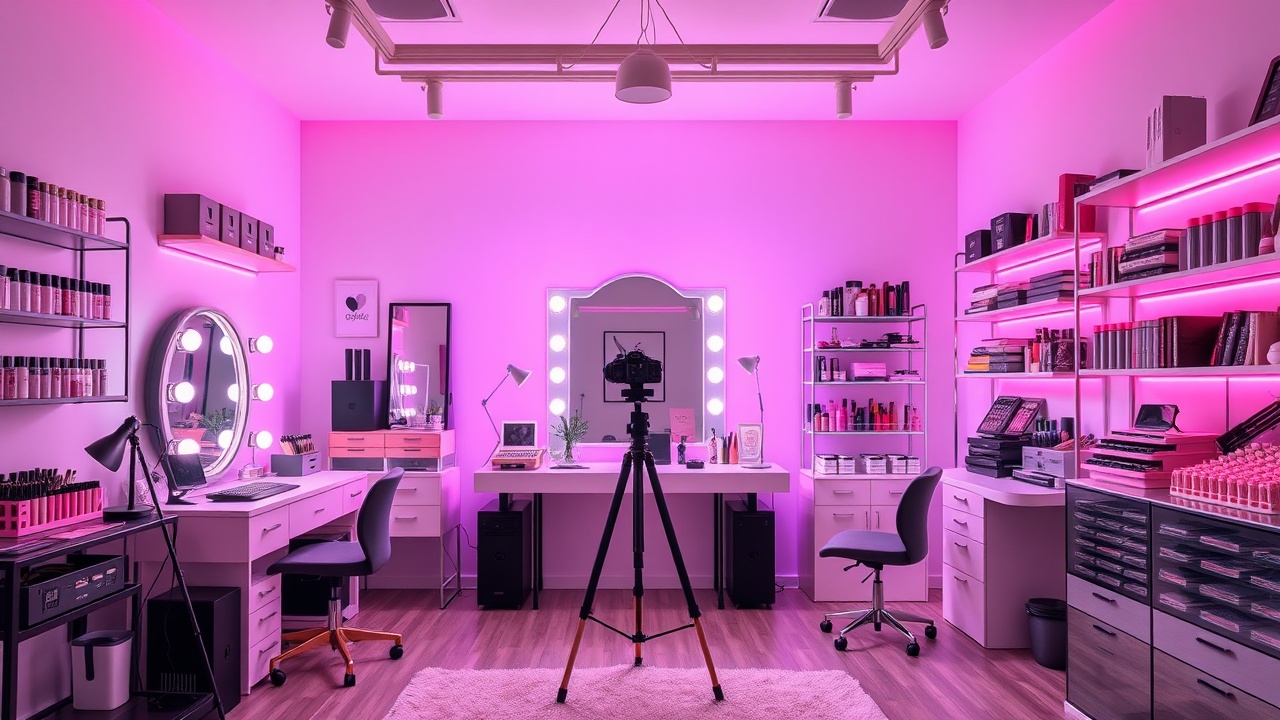
With 1.2 million subscribers and a reputation for flawless execution, Jade Rivera isn't just a beauty guru—she's a master of light and space. We sat down with her to break down exactly how she built a studio that rivals professional broadcast setups.
"The biggest mistake creators make is trying to get everything perfect on a phone camera," Jade explains. "My Mirrorly Mirror Studio became the anchor of my room because it forces me to face reality before I face the camera. It’s the difference between looking 'okay' and looking like a professional production."
Her studio isn't just a room; it's a workflow. Every light, every background, and every tool serves a specific purpose in her content creation process. Here is how she does it.
Jade’s 2,000 square foot studio is organized into three distinct zones: the Mirror Studio zone, the lighting rig, and the background wall. Here is how each piece serves a purpose.
The Mirror Studio Zone: Positioned at the front of the room, this is where Jade starts every morning. It acts as her primary vanity, her color corrector, and her camera monitor. The hardware is mounted on a custom-built floating island to allow for maximum movement in front of the camera.
The Lighting Rig: To the right of the Mirror Studio, a 12-point LED array mimics the natural light cycle. Because the Mirror Studio has tunable lights, Jade uses them to set the mood for her videos, then flips a switch to set the mood for her makeup application.
The Background Wall: The back of the room features a seamless grey velvet backdrop. It is paired with a ring light setup that can be raised or lowered depending on the height of the subject. The entire setup is optimized for a single camera angle, ensuring that every frame looks like a magazine cover.
Jade relies on three specific functions of the Mirrorly hardware to keep her content on-brand and her skin looking its best.
Jade uses the daily skin scan to check for dehydration before she starts her foundation routine. It prevents her from over-moisturizing, which can make her makeup look cakey under harsh studio lights.
The Mirror Studio's 12-zone lighting allows Jade to match foundation shades in natural daylight. She uses the app to log every product she tests, creating a permanent database of her exact shade matches.
During filming, she uses the app's live preview to frame her shots perfectly. The mirror captures her reflection in real-time, so she can adjust her posture and makeup without needing a second camera operator.
Lighting is the most important tool in your kit. Here is how Jade sets the stage for success.
For skincare close-ups, use hard light to reveal texture and pores. For makeup application, switch to soft, diffused light to blend imperfections.
Always use Key Light (main), Fill Light (soften shadows), and Rim Light (separate you from the background). Never film with just one light source.
Most creators look best in warm light. Use a 3200K-4000K light temperature to mimic the sun during the 'golden hour' for a natural, flushed look.
A messy background distracts from the product. Use a seamless backdrop or a solid color wall to keep the viewer's focus on your face and the makeup.
Light from above to avoid unflattering shadows under the nose and eyes. This mimics natural daylight and makes your features pop.
Jade’s professional setup represents a significant investment in her craft. Here is the approximate cost breakdown for her entire studio.
$2,499.00
$850.00
$1,200.00
$450.00
$320.00
$5,319.00
You don't need to buy everything at once. Start with the Mirrorly Mirror Studio and build your studio around it.
Watch Jade walk you through her entire setup, explain the software workflow, and show you how she creates her viral tutorials.
Ready to Create?
Whether you are starting with a vanity or a professional studio, Mirrorly provides the foundation for your best content. Start with the Mirror Studio and upgrade your workflow.
Free shipping on orders over $99